

Build an internal Business OS
~15 min TypeScript PythonWhat you’re building: MIOSA’s own BusinessOS template, Apache 2.0 - one private internal company OS where your team’s agents, apps, and data live together.
Primitives you’ll use: Organization and API key, Sandbox, Computer, Postgres, Deployment (Docker Host), Custom domain
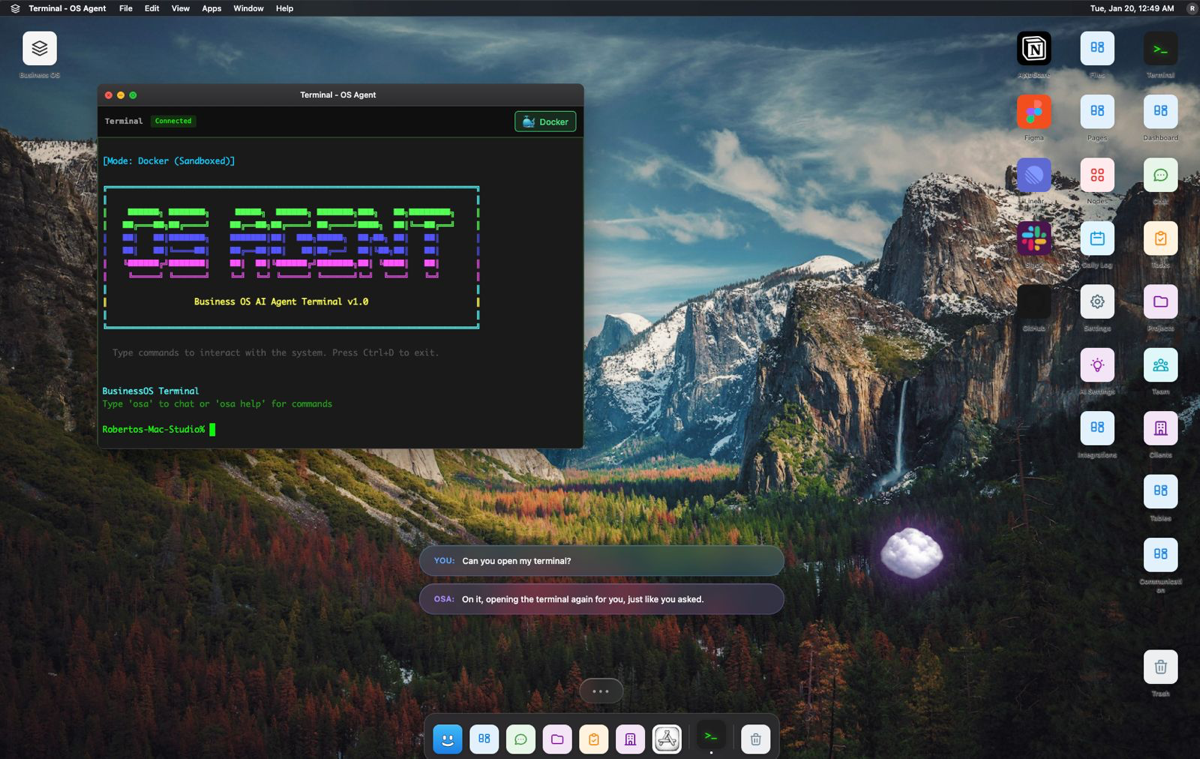
The BusinessOS desktop - draggable module windows, a real local terminal, and the OSA assistant. Screenshot from the BusinessOS repository (Apache-2.0).
Agent prompt
Start with your coding agent
A few quick questions, then copy a prompt for any coding agent.
Who is it for?
Pick one to start. The rest adapts to it.
What you're building
an open-source operating layer for running a business: workspaces, modules, a terminal and agents
A local-first desktop and web app: a Go backend with PostgreSQL and Redis, a SvelteKit frontend, an optional Electron shell, and a bundled Optimal Engine for knowledge and agent context.
Primitives you'll use: Organization and API key · Sandbox · Computer · Postgres · Deployment (App Engine) · Custom domain
- Draggable, persistent module windows
- Workspaces, roles and teams
- A real terminal (PTY) surface
- Governed knowledge and memory through Optimal Engine
- A custom-module builder
You install and run the real BusinessOS on MIOSA. Read the official docs first: github.com/Miosa-osa/BusinessOS. Every install command below comes from them; if the docs and this guide disagree, the docs win. BusinessOS is open source (Apache-2.0), from MIOSA.
What you need on MIOSA
Each row is one thing to create before you start. The number matches the step that uses it.
- Organization and API key Scopes every call; a workspace key is all a worker needs.
miosa api-key create app-key --preset agentDocs - Sandbox The isolated Linux workspace the agent writes code and runs commands in.
miosa create app-box --template nextjs --waitDocs - Computer A persistent Linux desktop for browser, mouse, and screenshot work.
miosa computer create app-desktopDocs - Postgres Managed relational data, injected as DATABASE_URL in the machine and in production.
miosa api POST /databases -d '{"name":"app-db","engine":"postgresql"}'Docs - A workspace per customer Isolates each customer’s machines, deployments, and data as they onboard.
miosa workspace create customer-1Docs - Branding and white-label Your name and slug on previews, deployments, and the desktop; customers never see MIOSA.
miosa orgDocs - Usage metering and bill-to Usage per customer, and which account pays for new machines.
miosa org billDocs - Deployment (App Engine) Publishes the app to an immutable, versioned URL with rollback.
miosa deploy create --from-sandbox app-box --name app --waitDocs - Custom domain Puts the app on a hostname you own, with HTTPS.
miosa deploy domain-add app app.example.comDocs
Architecture
How it runs on MIOSA
Where it runs -> a MIOSA sandbox (an isolated Linux workspace)
State and files -> Do not delete `.run/pgdata`; it is the local database. A persistent sandbox keeps it across pauses.
Model -> your own provider key, never a MIOSA platform key
Its web port 5273 -> a MIOSA preview URL (`miosa preview create`)
Your customers -> one workspace each, isolated from each other
Auth and tenancy
Your organization is the platform; customers never get a MIOSA account, they sign into YOUR product. One workspace per customer, created as they onboard, isolates their machines, runs and data.
miosa workspace create business-os-customer-1Tag every machine and run with the customer id in `metadata`, and never query across customers. Meter usage per customer with GET /api/v1/usage and set who pays with PUT /api/v1/bill-to (/docs/platform/usage-and-billing).
Install BusinessOS
Run these inside the sandbox (for example `miosa exec business-os-box -- bash -lc '<command>'`), in order. The commands are from the official docs.
git clone https://github.com/Miosa-osa/BusinessOS.git /workspace/BusinessOScd /workspace/BusinessOSmake onboardCheck: the install finishes without errors; the next sections configure and start it.
Configure
`make onboard` checks tools, creates local env files, initialises an isolated PostgreSQL cluster and Redis under `.run/`, starts the bundled Optimal Engine, installs dependencies and starts the backend, frontend and (unless `BUSINESSOS_HEADLESS=1`) the Electron shell. It needs Node 22+, pnpm 9.15.4, Go 1.26.2, PostgreSQL 14+, Redis 7+, Elixir/Mix and Python 3.
Model: chosen by your agent. Use a current model from a provider I have connected; ask which if none is.
Run it
Start it and prove it works.
make dev-local-verifymake dev-local-statusCheck: the tool starts without errors and responds.
Persistence and access
Do not delete `.run/pgdata`; it is the local database. A persistent sandbox keeps it across pauses.
It listens on port 5273. Run it as a background process so it outlives your shell, then open a preview:
miosa preview create business-os-box 5273 --name webCheck: the preview URL answers, and still answers after the machine pauses and resumes (previews wake it on request).
Make it a product
It is an internal-company OS; do not resell it as a multi-tenant product without reading its licence and README.
Limits and costs
Pin the version you tested and update deliberately; these tools change quickly.
Give the tool only the credentials it needs, as secrets, not baked into files.
Prototype: keep it to one machine at the default size, skip replicas and custom hostnames you do not need, and delete everything when you are done.
Acceptance checks
BusinessOS runs on a MIOSA sandbox and answers a real task.
State survives a pause and resume.
Each customer has its own workspace and its own instance; nothing is shared between them.
Everything it created can be deleted with nothing left running.
Next steps
Customizing it
BusinessOS is a template, not a fixed product: the meaning of a module comes from your company, not from the repo. A fresh install shows an intentional unshaped-module screen until you give it shape. Everything you edit lives in the clone you already have:
- Frontend and modules live in
frontend/(SvelteKit). A module is a route plus the people, agents, records, states, and policies it owns; start from an existing foundational route as a template. - Go backend lives in
desktop/: the API your modules call for their data. - Knowledge and agents come from the bundled Optimal Engine in
optimal-engine/, which gives the assistant memory, search, and agent context over your own data. - Workspace shape lives in
workspaces/: teams, roles, and the private projections a workspace starts from.
Change code in the running machine and restart the stack to see it:
miosa exec business-os-box --cwd /workspace/BusinessOS -- make dev-local-restartThe repository’s own docs/ cover the architecture, module authoring, and operations in depth.